Terrain Examples
    <h2 id="feature-extraction">Feature Extraction</h2>
    <div class="sideBySide">
Notes
We start by creating the terrain using a simple Perlin Noise with a few octaves.
Next, we connect it to the Height Output to ensure the data will be used, and then extract features using the Get Slope and Get Cavity nodes. We use the data generated by these nodes to select specific regions—such as areas with high slope or regions where the terrain is relatively flat—and paint them using the Color Output.
Finally, using the Fold node, we transform the flat region mask into a selection of all concave and convex areas.
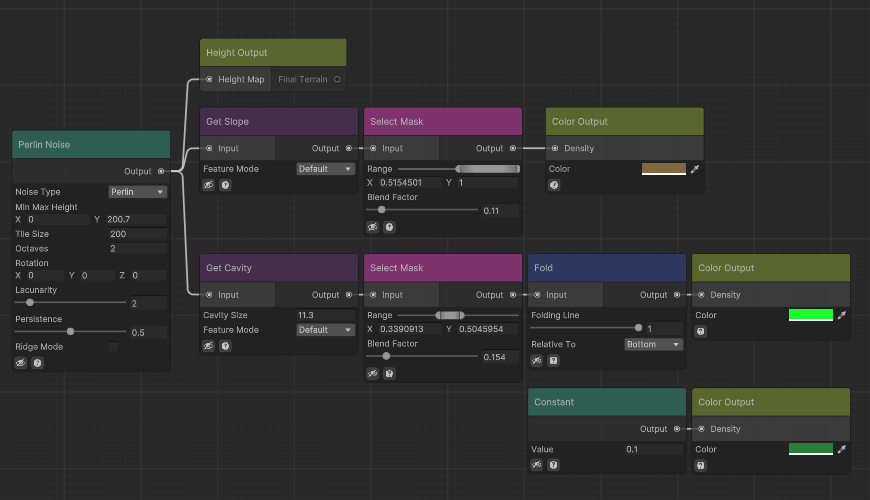
Node system
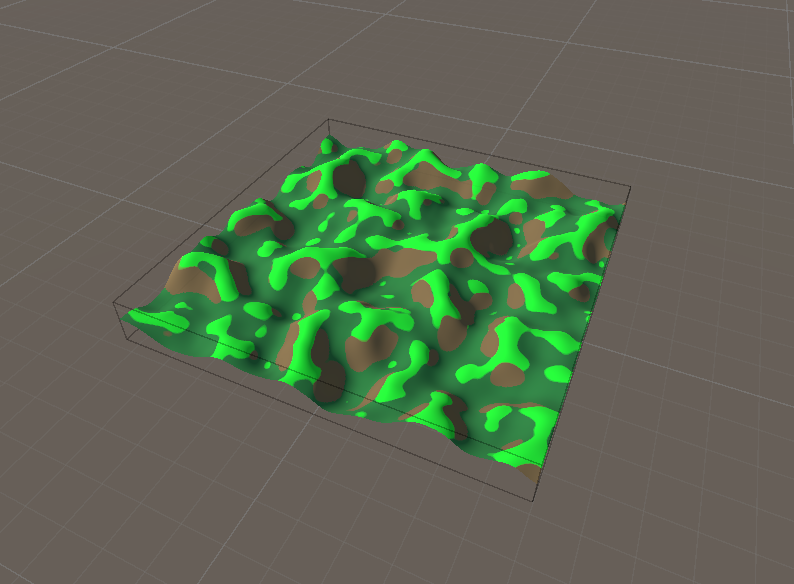
Result
    <h2 id="crop-pattern">Crop Pattern</h2>
    <div class="sideBySide">
Notes
We start by creating the terrain using a simple Perlin Noise with a few octaves.
Next, we connect it to the Height Output to ensure the data will be used, and then extract features using the Get Slope and Get Cavity nodes. We use the data generated by these nodes to select specific regions—such as areas with high slope or regions where the terrain is relatively flat—and paint them using the Color Output.
Finally, using the Fold node, we transform the flat region mask into a selection of all concave and convex areas.
</div>
Node system
Result
    <h2 id="desert-pyramids">Desert Pyramids</h2>
    <div class="sideBySide">
Notes
We start by creating the terrain using a simple Perlin Noise with a few octaves.
Next, we connect it to the Height Output to ensure the data will be used, and then extract features using the Get Slope and Get Cavity nodes. We use the data generated by these nodes to select specific regions—such as areas with high slope or regions where the terrain is relatively flat—and paint them using the Color Output.
Finally, using the Fold node, we transform the flat region mask into a selection of all concave and convex areas.
</div>
Node system
Result
</div>