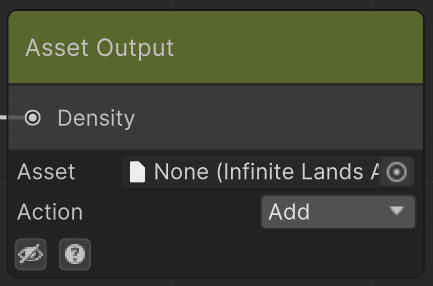
Outputs a density map that can be used by the proper processor to spawn assets.
- Asset: Asset to spawn or remove.
- Action: Choose whether this output adds or removes the asset.
At a density value of 1, Add places the asset in that area and Remove removes it.
Although it is recommended to manually precombine all density maps before setting them on the asset (so you have full control over the resulting density map), Action determines how this output affects the asset.
If multiple Asset Outputs with the same asset are set, their density maps will be combined by adding and subtracting the different weights, and then clamped to the range of 0 to 1.
The usual way of working with Asset Outputs is considering all assets will be blended together according to their weight, but they will not be prenormalized in relation to the other assets.
This means that two assets that have a weight of 1, will be blended with the same strength. You can make use of the Layers Node to distribute the weights in a more ordered manner.