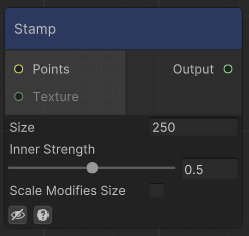
Outputs a height map where the points are. If a texture is set, it will use that data as a splat map. Otherwise it will output a circle of radious Size and height 0 to 1. Use Inner Strength to smoothen the transition of that circle.
- Size: If a texture is assigned, size will be the size of the data to get from the texture. For that reason, if using Shapes or Texture nodes, it is recommended to match (or be slightly bigger) than the maximum size. Anything outside of the size will not be taken into account. The sampling of the texture will also occur at world units (0,0), use Move Origin in case you want to change the position of the textures.
- Scale Modifies Size: Should Size be affected by the scale of the point? If a texture is assigned, it will also modify the size of the texture.
- Affected by Rotation: Should the input texture be rotatated by the rotation of the point?
Examples
Desert Pyramids
Recipe
Notes
To place different pyramid-like structures, we start by creating a grid of points and randomly positioning them. We use the Transform Position Node to randomize their position, rotation, and scale.
At each of these points, we create a pyramid using the Shape Node and spawn it with the Stamp Node. By ticking the required boxes, we ensure that the sampled shape follows the points data correctly.
Next, we apply some stepping to the pyramids to add texture, making them look more like layered cubes.
We then combine the pyramids with basic noise to give them a less uniform look, as though there’s sand on top of each layer.
Finally, we blend these pyramids with some Simplex Noise to achieve the final terrain.

Node system

Result